


The Gap Between Endpoint Detection and Access Control
Most MSPs already use Huntress to understand what’s happening on endpoints. It provides visibility into incidents, device health, and whether a device is still reporting or already resolved. The visibility is not the problem. The problem is what happens after.
When a device is flagged in Huntress, access does not change on its own. Someone still needs to review the alert, understand what it means, and take action in another system. That usually means updating a policy, restricting access, or manually following up on the device. Until that happens, the device stays connected under the same conditions.
That gap between detection and enforcement is small but constant. And in MSP environments, persistent gaps become operational overhead.
What the Integration Does
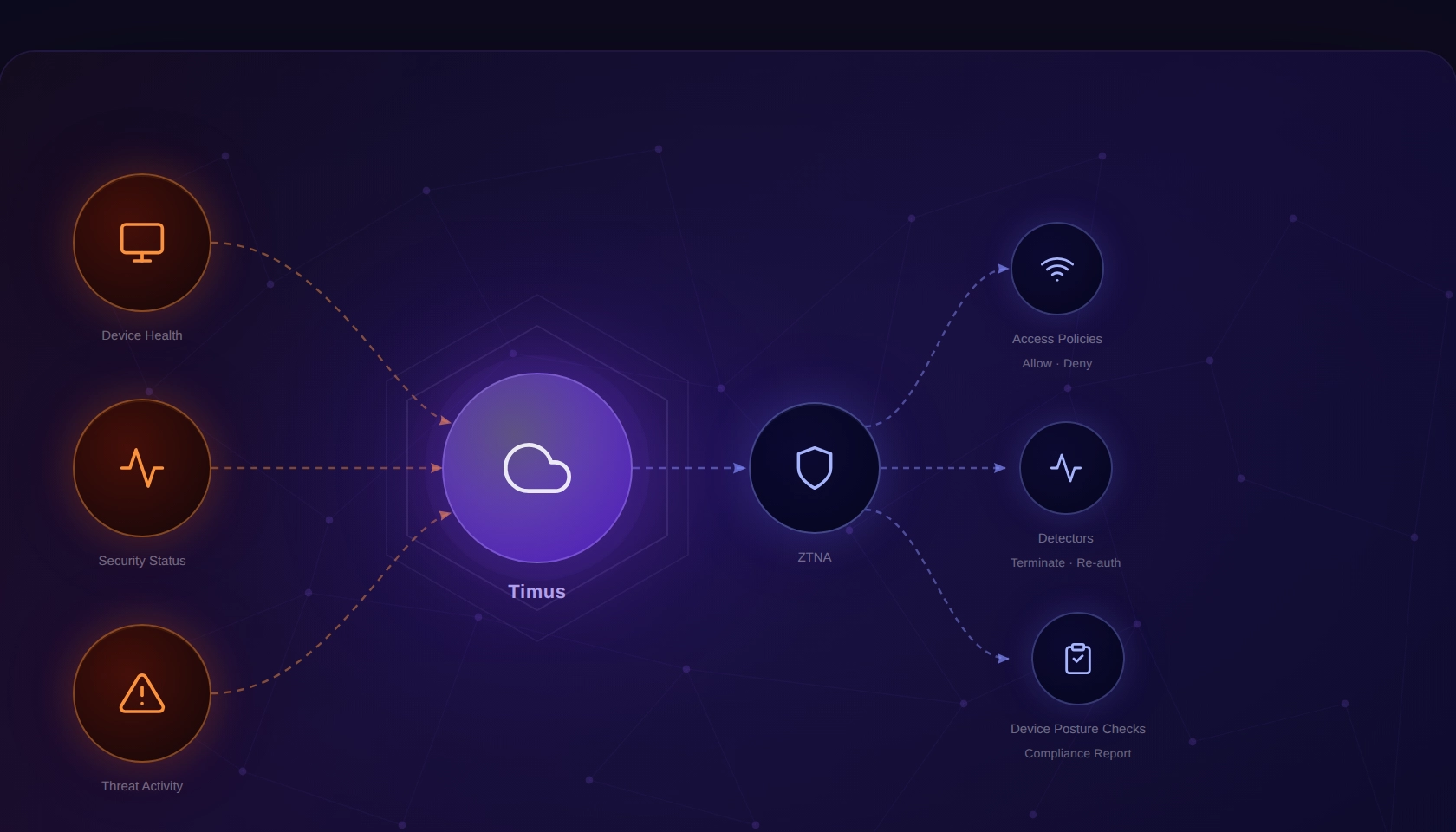
Once enabled, Huntress device signals are available directly inside the Timus SASE policy engine. You can use them as conditions in Adaptive Access Policies, Detectors, and Device Posture Checks within the Adaptive ZTNA model. This means access policies can evaluate a device’s real-time state based on what Huntress reports, without requiring manual intervention.
The practical effect: policy decisions can now reflect the actual security state of an endpoint, as Huntress sees it, in real time. If a device has an open critical incident, a stopped agent, or a firewall that’s been disabled, Timus can act on that — automatically, without a technician needing to connect the dots between two consoles.
Bringing Huntress Signals Into Access Decisions
With Timus Cloud 2.0.3, Huntress is now integrated as an EPP within Timus. Once enabled, Huntress signals can be used directly as conditions inside policy rules. Instead of being something you review and act on later, those signals become part of how access decisions are made.
Using Endpoint Signals Inside Policies
The integration brings multiple Huntress signals into Timus, including incident severity and status, agent check-in behavior, Microsoft Defender health and compliance, firewall status, operating system details, and indicator types. These signals can be used individually or combined to define how access behaves.
What changes here is not the data itself. MSPs already had this information. What changes is that the same signals can now directly influence access decisions at the policy level.
The Eight Huntress Signals Available in Timus
The integration surfaces eight specific signals from Huntress. Each one represents a different dimension of endpoint health or risk, and each can be used independently or in combination when building policy conditions.
| Signal | What it represents | Practical meaning |
|---|---|---|
| Last Agent Check-in | Time since the Huntress agent last reported to Huntress | Older check-in often indicates the device is offline, the agent is stopped, or communication is blocked. |
| Defender Policy Status | Defender configuration compliance as evaluated by Huntress | Compliance signal (policy expectations met or not). This is not runtime health. |
| Defender Status | Defender runtime health state | Shows whether Defender is healthy, unhealthy, disabled, or incompatible. |
| Firewall Status | Host firewall state (and isolation-related states if present) | Shows whether firewall protection is enabled and whether isolation states apply. |
| Operating System | OS family reported by Huntress | Useful for filtering by platform (Timus supports Windows and macOS in this context). |
| Incident Severity | Severity of the most relevant/recent incident | Helps distinguish low-risk findings from high/critical impact signals. |
| Incident Status | Lifecycle status of the incident | Prevents triggering on resolved incidents by separating open vs closed/dismissed states. |
| Indicator Types | Categories of activity Huntress reported for the incident | Helps identify the nature of risk (persistence footholds, ransomware signals, detections, etc.). |
What Does This Change for MSP Operations
When Huntress flags a device, your team knows about it — but acting on that finding in Timus SASE has required a separate, manual step. That window between detection and enforcement is where risk lives.
With this integration, the window closes. A policy condition based on Incident Status or Incident Severity can automatically restrict a flagged device’s access until the incident is resolved. A condition based on Last Agent Check-in can catch devices where Huntress has gone dark. A Firewall Status condition can enforce that only devices with active host firewall protection maintain access to sensitive resources.
Instead of reviewing alerts and then switching tools to enforce access controls, MSPs can define policies that automatically respond to endpoint conditions. A device with an active incident can be treated differently from one that is healthy. A device that stops reporting can be treated as untrusted. A device without proper security controls can have restricted access based on that condition alone.
This reduces the dependency on manual action and keeps enforcement consistent across environments. The policy reflects the actual state of the endpoint, not a delayed interpretation of it.
How the Integration Is Scoped
Timus is built for MSP operations, so the Huntress integration supports two scopes.
Partner scope is designed for MSPs who manage Huntress centrally. Your team creates and manages a single API credential in Huntress, then activates the integration across multiple customer environments in Timus. One setup process, coverage across all your clients.
Customer scope is for situations where a customer manages their own Huntress organization independently. They create the API credential themselves, and the integration applies only to their tenant.
In both cases, setup follows the same path in Timus: Settings → Integrations → Huntress EPP Integration → Manage → enter your API Key and Secret → Save.
One important detail worth flagging to your team: Huntress displays the API Secret only once, at the moment the credential is created. It cannot be retrieved afterward. If it’s lost, a new credential has to be created and Timus updated with the new values. Similarly, if credentials are rotated in Huntress, Timus needs to be updated immediately — otherwise the signals will stop updating in your policies.
Where Huntress Signals Work in Timus
Huntress signals are available as conditions in three Adaptive ZTNA policy types, all currently in Beta:
- Access Policies — use Huntress signals to control whether access is granted, restricted, or blocked
- Detectors — incorporate Huntress incident data as a trigger condition
- Device Posture Checks — include Huntress agent health and status as part of posture evaluation
The integration requires Adaptive ZTNA to be enabled in the tenant. End users must be running Timus Connect 5.0.0 or higher. It is not available in legacy Sign-In Policies or legacy Device Posture Checks.
Closing the Gap Between Detection and Enforcement
Huntress continues to provide endpoint visibility. Timus uses that visibility inside the access layer. The result is that access decisions can reflect endpoint state without waiting for manual action.
For MSPs, this removes a consistent operational step. Detection and enforcement are no longer separate processes. They become part of the same system.
Timus is a SASE platform built for MSPs. To learn more about Adaptive ZTNA or the Huntress integration, visit timusnetworks.com.



 Tie-mus (like “time-us,” but sharper)